
Cursor Camp Online: Big Hangout Energy, Tiny Cursor Avatar
Play Cursor Camp instantly in your browser - No download required!
Share Cursor Camp with Friends!
Discover More Cursor Camp
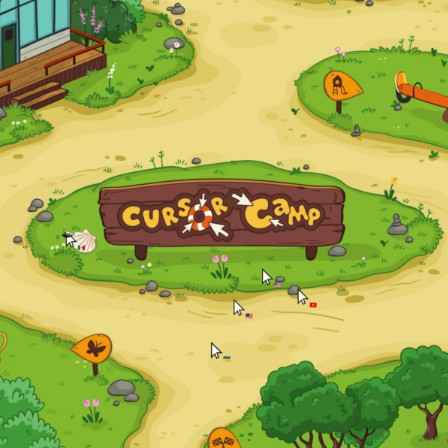
Cursor Camp
Color Surfer

Rooster Road

Joy Garden

Racing Pop
Goat Rampage
Tower Shot

Long Leg Master
Farting Flight

Wobbly Pets
Speed Slope
Arrow Arena

Kick the Buddy
My Cake Shop

Loaf Clicker

Sphere Rush
Neon Rush
Explore Other Exciting Games
Sprunki Sky Treatment
Sprunki Paranormal
Sprunki Phase 11 Definitive
Simon Time Phase 2
Scrandle
Sprunki Shifted
Sprunki Wenda Treatment 2.5
2048
Pokerogue

Sprunki Incredibox: Long Hand
The Cursor Is the Character
Cursor Camp is a relaxed social browser game where a simple cursor represents you instead of a detailed avatar. That tiny change gives the whole thing a pleasantly stripped-back feel: less character design, more hanging out.
Get Your Tiny Self Settled
Open the Browser Game
Launch Cursor Camp in your browser. There’s no separate game installation to get through first.
Meet Your Cursor Self
Your on-screen identity is a cursor rather than a full character. Take a moment to get used to that minimal look.
Check the On-Screen Guidance
Look for any instructions the game provides before trying things out. Follow those for specific inputs rather than assuming familiar arcade controls.
Take In the Social Side
Give yourself a moment to see what’s happening around you. This is a relaxed social experience, so you don’t need to treat every second like a speedrun.
A Few Things Before You Camp
What is Cursor Camp?
It’s a relaxed social browser game where you’re represented by a simple cursor. The idea is much closer to a low-key hangout than a detailed avatar-based world.
Can I play Cursor Camp online?
Yes, Cursor Camp is a browser-based online experience. Open the game page to get started.
Do I need to download Cursor Camp?
No separate game installation is needed. You play through your browser.
What does my character look like?
Your character is a simple cursor, not a detailed avatar. Yep, the little pointer gets the starring role.
Is Cursor Camp a casual game?
Yes, it’s listed in the Casual category. Its description emphasizes a relaxed social experience.
Is this a solo game or a social game?
Cursor Camp is described as a social experience. Don’t expect the focus to be a solo story campaign.
Does Cursor Camp have battles?
The listing includes a battle tag, but the available description doesn’t explain any combat mechanics. The clearest description of the game is a relaxed social hangout.
What are the controls?
The available description doesn’t specify exact inputs. Check the game’s on-screen guidance for controls rather than assuming particular mouse buttons or keys.
Can I customize my cursor?
Customization isn’t confirmed in the available game information. Have a look at any in-game options before planning your cursor makeover.
Does Cursor Camp work on phones?
Mobile compatibility isn’t specified. Check how the game loads and what input guidance it gives on your device.
Is Cursor Camp unblocked at school?
That depends on your school’s network rules, not just the game. Use it only where browser gaming is allowed.
Is there a score or a win condition?
The available description doesn’t mention scoring or a specific win condition. Start with the social premise and check the game itself for any additional goals.
Why Hang Out as a Pointer?
The Premise Is Amusing
A cursor as your entire character is wonderfully matter-of-fact. Sometimes that’s more appealing than another heavily armored hero.
Keep It Low-Key
The relaxed social focus suits a quieter gaming mood. You can show up without expecting a high-pressure arcade session.
Leave the Installer Alone
Browser play means there’s no separate game to install. Handy when you just want to check something out.
Try a Different Kind of Presence
Dropping the detailed avatar changes how a social game feels. Here, a tiny pointer gets to carry your on-screen identity.
Your Browser Is Enough
Open Cursor Camp in your browser and head straight for the game without installing a separate app. Your detailed avatar can take the day off; a little cursor has this shift.
Small Avatar, Different Vibe
A Cursor for an Avatar
Forget the detailed character model: a simple cursor stands in for you. It’s a funny little reminder of how little a game needs to give you a presence.
Social at Its Core
The focus is a shared social experience rather than a solo adventure. Think browser hangout, not an elaborate character campaign.
A Relaxed Pace
Cursor Camp is built around a laid-back mood. Bring your hanging-out brain instead of your ranked-match brain.
Browser-Based Play
The game runs in your browser without a separate installation. That makes it an easy option when you don’t fancy adding another game to your device.
A Little Less Rushing Helps
Read Before You Experiment
A cursor-shaped character doesn’t tell you everything about the controls. Any on-screen instructions are a better guide than guessing.
Check for control guidance when the game opens.
Watch the Social Flow
Give yourself a moment to understand the shared space before trying to make something happen. A relaxed hangout doesn’t need a dramatic entrance.
Spend your first moment observing what’s on screen.
Keep Expectations Casual
The battle and arcade tags don’t establish specific rules or objectives. Let the actual game show you what there is to do.
Check for stated goals before chasing a win.