
Racing Pop: Let the Car Steer, Get Your Timing Just Right
Play Racing Pop instantly in your browser - No download required!
Share Racing Pop with Friends!
Discover More Racing Pop
Racing Pop
Goat Rampage
Tower Shot

Long Leg Master
Farting Flight

Wobbly Pets
Speed Slope
Arrow Arena

Kick the Buddy
My Cake Shop
Loaf Clicker

Sphere Rush
Neon Rush
Explore Other Exciting Games
Sprunki Away
Tap Road Beat

Sprunki Raddy Treatment
Sprunki 1996 But Pyramixed
2048
Sprunki Poppy Playtime Phase 5
Sprunki Phase 888 Death
Incredibox Mustard
Hard Working Man
Sprunksters MSI
A Racer Without the Steering Wrestle
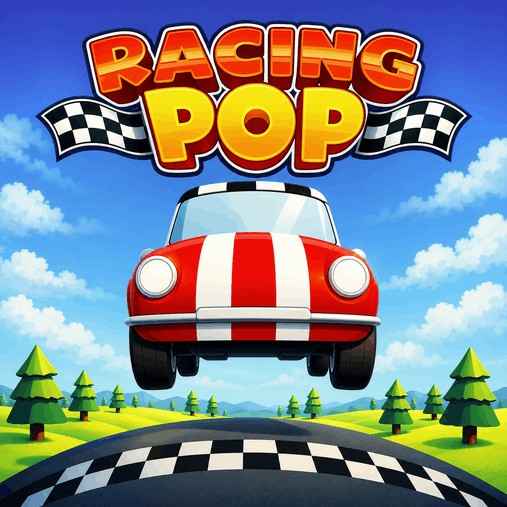
Racing Pop is a casual arcade racing game that puts timing ahead of traditional steering. Your vehicle follows the road automatically, so you can pay attention to when you act instead of constantly correcting your direction. Less wrestling with the wheel, more watching for your moment.
Get Rolling Without Overthinking It
Check the On-Screen Instructions
Look for the game's instructions before you begin. Use those to confirm the inputs rather than assuming it handles like a regular racing game.
Let the Car Follow the Road
Your vehicle handles the road-following automatically. You don't need to treat every bend as a manual steering job.
Watch Before You Act
Keep your attention on what's happening along the road. Timing matters here, so avoid making inputs just to stay busy.
Adjust Your Timing
Notice what happens after each action. Use that feedback to judge whether your next attempt needs to come earlier or later.
Small Habits, Better Timing
Observe Before Reacting
An automatic route gives you a chance to watch without worrying about steering. Use that attention to understand what's happening before you commit to an input.
Spend your opening moments watching the road.
Change One Thing
If your timing feels off, changing everything at once makes it harder to understand why. A small adjustment gives you clearer feedback.
Try acting slightly earlier or later next time.
Don't Mash Through Confusion
Extra inputs aren't a substitute for knowing when to act. If you're unsure what went wrong, slow down your decision-making rather than pressing more.
Make each input deliberate.
What Makes This Racer Different
Automatic Road-Following
The vehicle follows the road on its own. That takes traditional steering out of the spotlight.
Timing Takes the Wheel
When you act is the main focus. It's a different kind of concentration from keeping a car pointed through every turn.
Casual Racing Setup
Racing Pop takes a casual approach rather than pitching itself as a driving simulation. Come for arcade racing, not a lesson in realistic car handling.
Browser-Based Play
Jump in through your browser without installing a separate game. Handy when you want to play without turning it into a setup project.
Why Give It a Spin?
Leave Steering to the Car
Not in the mood to correct your racing line at every bend? Automatic road-following lets you put that job aside.
Give Timing Your Full Attention
With steering handled, you have more room to watch and react. The interesting question becomes when to act, not where to point the car.
Keep It Arcade
Sometimes you want a racing game without the simulation mindset. This one keeps its focus on a casual, timing-led challenge.
Skip the Installation
Open the browser game instead of managing a download. You can spend your time figuring out the timing rather than setting things up.
Browser Open? You're Nearly There
Play Racing Pop straight in your browser on sprunkiy.com, with no game installation needed. Let it load, check the instructions, and give that timing a test.
Questions From the Starting Line
What is Racing Pop?
Racing Pop is a casual arcade racing game built around timing. The vehicle automatically follows the road instead of relying on traditional manual steering.
Do I have to steer the car?
The car follows the road automatically. Your attention goes toward timing rather than constantly choosing a direction.
What controls does Racing Pop use?
Check the on-screen instructions for the exact inputs. Automatic road-following doesn't tell you which buttons the game uses, so it's worth checking before you start.
Is this a realistic racing simulator?
No, Racing Pop is described as a casual arcade racer. Its timing-focused approach is different from practicing realistic steering and vehicle handling.
Can I play Racing Pop online?
Yes, you can jump into Racing Pop through your browser on sprunkiy.com. There's no separate installation to work through.
Do I need to download anything?
No game download is needed for browser play. Open the game page and let it load.
Does automatic steering mean I just watch?
Nope—the road-following is automatic, but timing is still the focus. Letting the car handle direction doesn't remove your part in the action.
What's a useful beginner habit?
Watch what happens after an input before rushing into the next one. That gives you something concrete to use when adjusting your timing.
Can I play Racing Pop unblocked?
Access depends on the rules of your network or device. A browser game can still be restricted, so follow the policies wherever you're playing.
Why try this instead of a traditional racer?
Try it if steering corrections aren't your favorite part of racing games. Racing Pop shifts the challenge toward choosing your moment while the car follows the route.